
So you post a video on TikTok and then you think, oh no, something’s up. Maybe you forgot to add text. Maybe the caption has a typo. Or perhaps you just experienced a short in the video.
Now you are thinking about How to Edit a TikTok Video After Posting? Can you edit a TikTok video live on? Short answer? No, not directly. TikTok doesn’t allow video edits after videos have been posted. But don’t worry. There are ways around it.
How to Edit a TikTok Video After Posting
TikTok keeps things simple. Once a video gets posted you can’t Edit TikTok video after posting, it will be just how you left it. You can Edit caption on TikTok or privacy settings, but the real video? That’s locked in.
It’s annoying, yeah. But it makes sense from their end.
So here is what you may be able to do.
1. Save, Edit, and Repost
This is the most simple way to edit a TikTok post. You’re basically downloading your own video and making some changes to it and uploading it again.
Here’s how it works.
1. Go to your profile and locate the video that you want to fix.
2. Tap on that so that it opens up to full screen.
3. Now look for the three dots on the right side.
4. That’s your options menu. Tap it.
5. You’ll see a bunch of choices.
6. Find this one that says Save video. Tap that.
7. TikTok will save the video directly on your phone.
8. Now you can Change TikTok video after posting, the way you consider fit.
9. Use TikTok editor again, or another app if you are interested in something fancy.
10. Once you are pleased with the new version then post it like normal.
11. Then go back and purge the old one.
2. Start Fresh
Sometimes saving and re-editing is not enough.. Maybe the lighting was poor or maybe you want to change the whole concept.
In that case, just remake it from the ground up.
Delete the video you posted. Then go to the plus icon below TikTok. In order to do this, go back to your cell phone and search the gallery for your original clip (the clip before you added all of your TikTok things).
Now go and edit it the way you should have the first time. Take your time. Change to some right text, some better music, whatever you need.
What About the Captioning and the Hashtags?
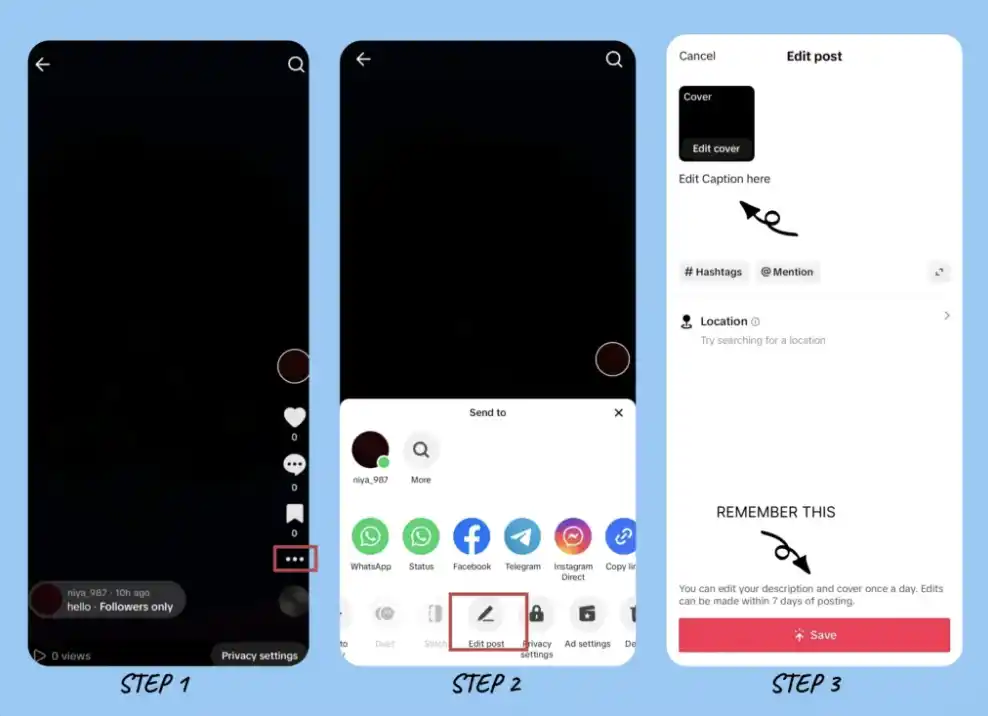
Good news here. You can easily edit captions if you post. TikTok allows you to change the text without having to touch the video itself.
Just go on to your video, tap all of those three dots again, and select Edit. You can edit your caption, add or remove hashtags, tag different people – whatever you need.
The Bottom Line
The thing is, TikTok not letting you edit posted videos is very annoying. But, it is not the end of the world.
Save your video, make it cooler and repost. Or if it’s really messed up just start over. Either way it’s possible to get it right.
And TikTok at least allows you to edit captions that could be worse.